
Phone Number Information Bot for Telegram
Search any mobile number for carrier details, line type, country info, spam risk, and public social media signals directly inside Telegram with @SocialMediaPhoneLookupBot.
- No Contact Card Sharing Required
- 13+ Public Social Networks
- International Number Support
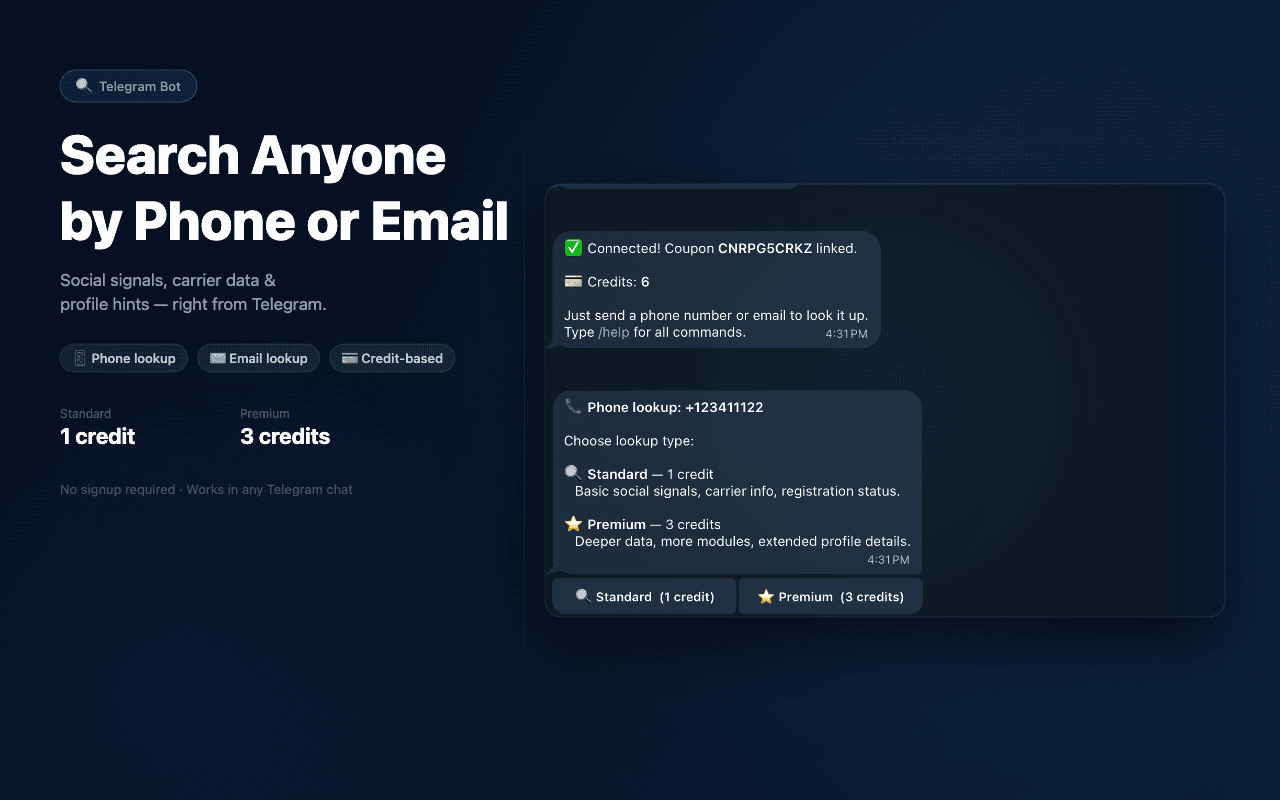
What Can the Telegram Number Info Bot Check?
SocialMediaPhoneLookupBot gives you quick phone number intelligence without leaving Telegram. Instead of running multiple separate searches, send a phone number to inspect available technical metadata, carrier registration, and public social footprints.
Carrier & Line Type
Identifies the mobile network operator, telecom carrier, and validates whether the line is registered as a Mobile, Landline, or virtual VoIP number.
Public Social Footprints
Scans for registered accounts across WhatsApp (including public profile photos when available), Telegram, Truecaller, Facebook, Instagram, Twitter/X, and LinkedIn.
Country & Format Validation
Confirms international country codes, geographic dialing territories, regional prefix validity, and standard E.164 compliance across 150+ countries.
Spam & Risk Context
Reviews community spam ratings, Truecaller risk tags, and digital footprint indicators to help you identify telemarketers, suspicious callers, or unknown contacts.
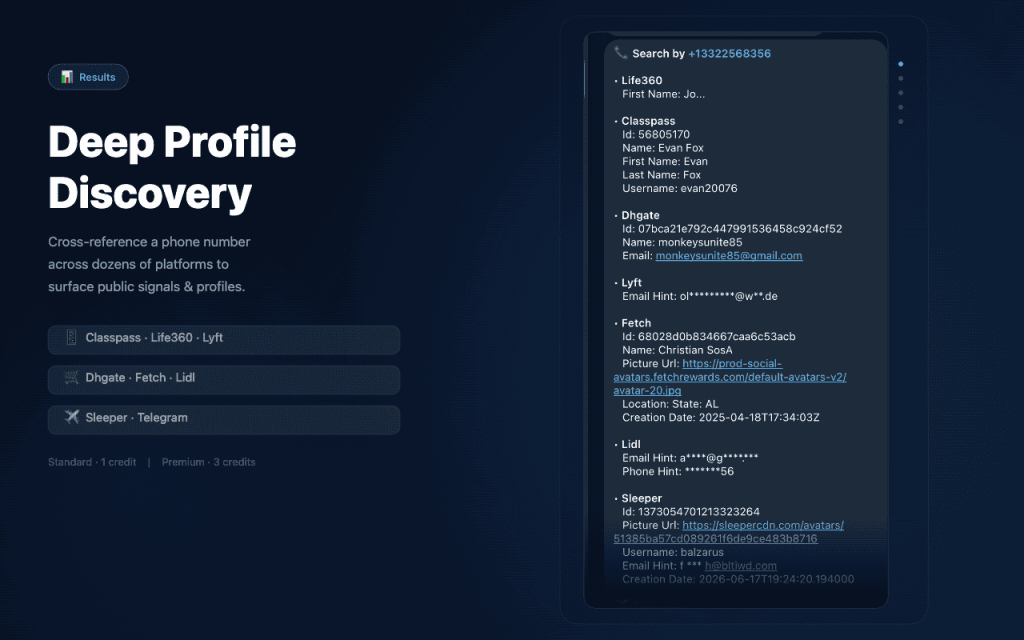
How to Use SocialMediaPhoneLookupBot
SocialMediaPhoneLookupBot is an authenticated utility powered by CatfishNumber credits. Follow these 4 steps to link your credits and run your first search:
Get Credits
Purchase lookup credits on CatfishNumber (1 credit per Standard search, 3 credits per Premium search). Your coupon code will be displayed on your receipt and order email.
Open the Bot
Launch the official bot inside Telegram on your phone, desktop app, or browser. Tap Start or send the /start command.
@SocialMediaPhoneLookupBotConnect Your Code
Link your coupon by sending /coupon YOURCODE. If connecting from your dashboard, you can also use your temporary 8-character link code with /connect ABC12345.
/coupon YOURCODESend a Phone Number
Paste the phone number into the chat (in international format with +). Select Standard or Premium on the buttons provided, then review your results.
+12125551234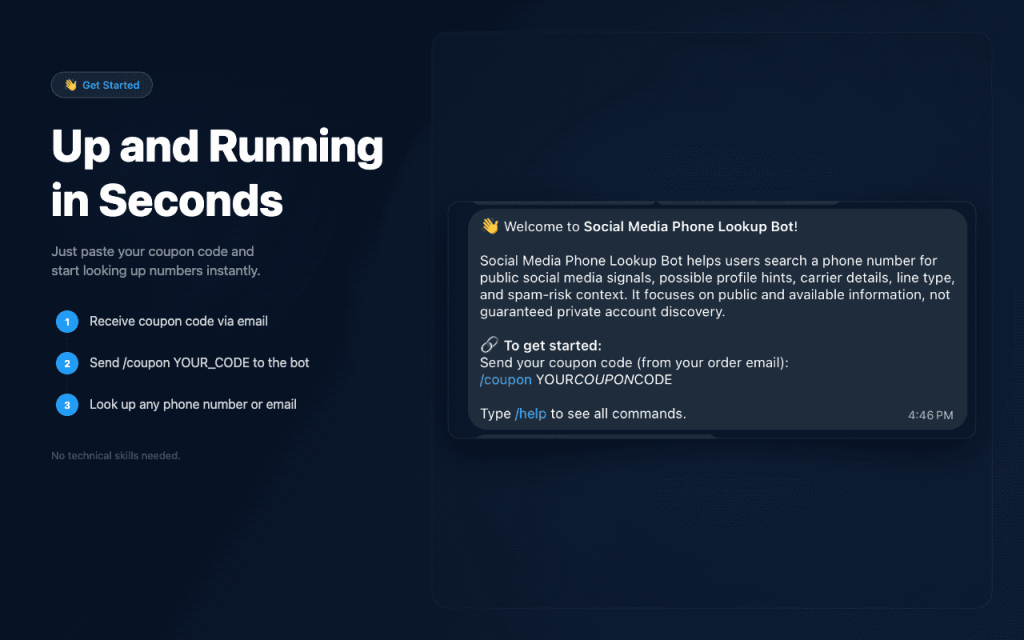
Phone Number Formats the Bot Accepts
SocialMediaPhoneLookupBot normalizes numbers to international E.164 format. For the most accurate carrier lookup and profile discovery, always include the leading plus sign (+) and the international country code.
Supported International E.164 Examples
-
United States & Canada (+1)
+1 212 555 1234
or
+1 (212) 555-1234 - India (+91) +91 98765 43210 10-digit mobile with +91
- United Kingdom (+44) +44 7911 123456 omit the local leading trunk 0
00 (e.g. 0091...) or regional local prefixes like 07.... Always format the number with + followed directly by the country code (e.g. +91... or +44...). You can send the number directly as a regular chat message or use /lookup +1234567890.Standard vs. Premium Telegram Lookup
Whenever you send a phone number, the bot asks you to select either Standard or Premium. Premium is never charged automatically. You choose the search depth for each individual query:
| Feature / Attribute | Standard Lookup (1 Credit) | Premium Lookup (3 Credits) |
|---|---|---|
| Credit Cost | 1 Credit | 3 Credits |
| Query Timeout | Standard (80-second timeout) | Extended (90-second timeout) |
| Carrier & Line Type | Mobile / Landline / VoIP detection | Mobile / Landline / VoIP detection |
| Country & Format Validation | Included | Included |
| WhatsApp Profile Picture | Delivered if publicly visible | Delivered if publicly visible |
| Social Platform Scans | Basic registration check across primary networks | Deeper public profile hints, links & auth providers |
| Digital Breach Footprints | Not included | Scanned across extended OSINT modules |
| Billing Selection | Manual button confirmation | Manual button confirmation (never automatic) |
*Results depend on publicly available signals. If a phone number has no active digital footprint, the bot returns all available carrier and validation data.
Useful SocialMediaPhoneLookupBot Commands
SocialMediaPhoneLookupBot supports clean slash commands to manage your credits, check account status, and review recent lookups. You can also send a phone number or email directly without any command.
| Command | Purpose & Behavior | Quick Action |
|---|---|---|
/start | Displays the bot welcome guide, pricing summary, and onboarding help. | |
/coupon YOURCODE | Links your CatfishNumber coupon code to your Telegram chat. | |
/connect ABC12345 | Connects a 1-time 8-character link token generated from your dashboard. | |
/lookup +number | Runs a phone lookup (e.g. /lookup +12125551234). You can also just send the number directly. | |
/credits | Checks your remaining credit balance and shows pricing tiers. | |
/mycoupon | Shows your linked coupon code, remaining credits, and coupon expiration date. | |
/history | Displays your last 5 phone lookups performed within the last 30 days. | |
/changecoupon NEWCODE | Switches your Telegram chat connection to a new or different coupon code. | |
/email user@example.com | Searches public social and account footprints associated with an email address. | |
/buycredits | Provides direct pricing links to purchase additional CatfishNumber credits. | |
/disconnect | Unlinks your Telegram chat from your coupon code. | |
/help | Lists all available commands and formatting guidelines. |
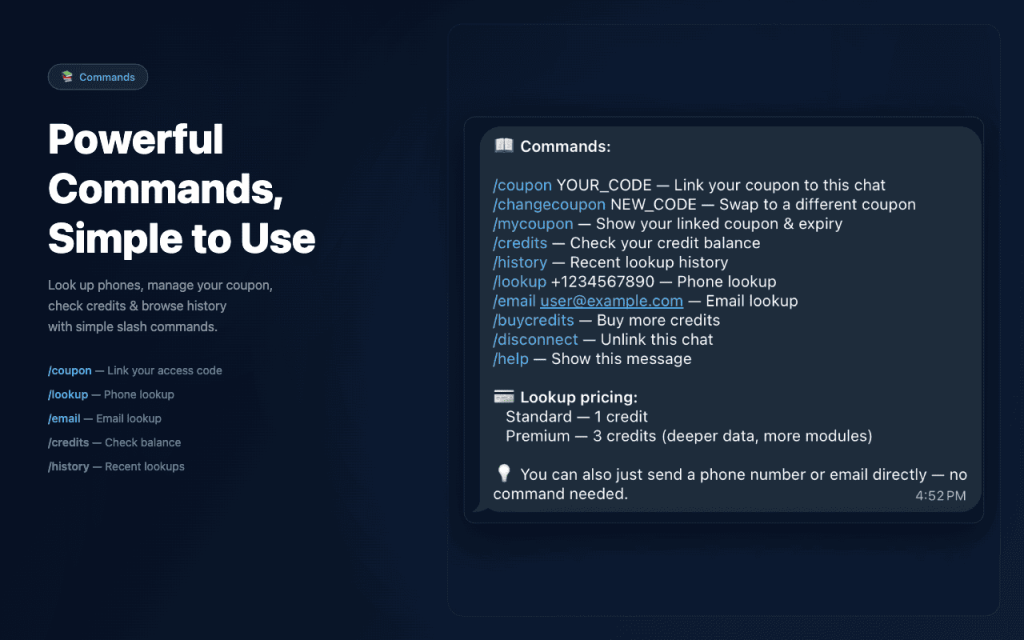
Telegram Bot vs. CatfishNumber Website Lookup
Both the Telegram bot and the CatfishNumber website access our unified intelligence backend and share your coupon credits. Choose the workflow that best fits your immediate research needs:
Use the Telegram Bot When:
- You are on a mobile device and want quick answers inside Telegram.
- You want to review incoming calls or WhatsApp messages without opening a browser.
- You want public profile avatars sent directly into your chat conversation.
- You prefer using simple text commands like
/creditsand/history.
Use the Website Lookup When:
- You are working at a desktop computer and prefer a large browser layout.
- You want interactive web tabs, printable reports, and full account management.
- You want to run reverse image or FaceCheck searches alongside phone lookups.
- You need to view detailed order receipts or generate 1-click Telegram connect tokens.
What the Bot Cannot Do
CatfishNumber operates an ethical OSINT research service. We believe in clear expectations rather than exaggerated marketing claims:
🚫 No Live GPS Location Tracking
SocialMediaPhoneLookupBot is a phone-number intelligence tool, not a device tracker. It does not provide real-time GPS tracking, phone tapping, or live location monitoring. Queries such as “number tracker” return country, carrier, and public profile data only.
🔒 No Access to Private Social Data
The bot inspects publicly indexed signals only. It cannot view private social media profiles, read private messages, bypass two-factor authentication, or access password-protected accounts.
♻️ Reassigned Number Caveat
Mobile carriers frequently reassign disconnected phone numbers. If a previous owner registered accounts with the number, historical profile signals may reflect that prior user rather than the current subscriber.
🛡️ Profile Hints ≠ Proof of Identity
A social profile hint or registration match indicates that a phone number was associated with a service. It does not constitute legal proof of individual identity. Data availability varies by carrier and user privacy settings.
Telegram Phone Number Lookup FAQs
Answers to common questions about using @SocialMediaPhoneLookupBot on Telegram:
What is a phone number information bot?
A phone number information bot is an automated chat utility inside Telegram that lets you submit a phone number to check available carrier registration, line type (Mobile, Landline, or VoIP), country of origin, spam-risk context, and public social profile hints without leaving the Telegram messaging app.
How do I look up a phone number in Telegram?
First, open @SocialMediaPhoneLookupBot and connect your CatfishNumber coupon code using /coupon YOURCODE. Once connected, paste the phone number into the chat in international format (e.g. +12125551234 or +919876543210), choose Standard or Premium, and the bot will return available intelligence.
Can the bot find social media accounts from a phone number?
Yes. The bot checks public digital footprints across 13+ major platforms, including WhatsApp, Telegram, Truecaller, Facebook, Instagram, Twitter/X, and LinkedIn. If a public WhatsApp profile picture is available, the bot sends the image directly into your chat.
Can it track someone’s live location?
No. SocialMediaPhoneLookupBot does not provide live GPS tracking or physical device surveillance. It returns registered country details, carrier information, and public web footprints. Any Telegram bot claiming to provide live personal GPS tracking without device consent is either inaccurate or deceptive.
Does it work internationally?
Yes. The bot supports phone numbers from over 150 countries worldwide, including the United States, India, Canada, the United Kingdom, Australia, and European nations. Always include the international dialing prefix (e.g. +91, +1, +44).
Do I need a coupon or credits before using the bot?
Yes. The bot requires an active CatfishNumber coupon code to run lookups. You can purchase credits on the CatfishNumber pricing page, then connect the coupon code received in your order email by sending /coupon YOURCODE in the bot.
What is the difference between Standard and Premium?
Standard lookup costs 1 credit, runs an 80-second query, and returns carrier details, line type, country, and basic registration footprints. Premium lookup costs 3 credits, enables an extended 90-second query, and checks deeper OSINT modules, public profile links, and breach records. Premium is never charged without your explicit button click.
Can I search an email address instead of a phone number?
Yes. You can send an email address directly into the chat or use the command /email user@example.com to run an OSINT digital footprint search on an email.
What does /history store?
The /history command displays the last 5 phone lookups performed on your linked coupon within the past 30 days. In our internal audit logs, searched phone numbers are irreversibly hashed using SHA-256 for privacy protection.
What does /disconnect do?
The /disconnect command unlinks your Telegram chat ID from your CatfishNumber coupon code. It prevents further searches from your Telegram chat unless reconnected. It does not delete past billing records in WooCommerce.
Why did the bot find little or no social media information?
If a phone number is newly activated, rarely used online, registered under strict privacy settings, or belongs to a landline, public digital footprints may not exist. The bot will still return carrier metadata, line type, country information, and format validity.
Start Looking Up Numbers in Telegram
Get instant carrier verification, line-type context, spam risk, and public social media profile signals with SocialMediaPhoneLookupBot.
Need credits first? Choose a package on CatfishNumber →